Making developer tools easier to build with
The Builder UI - A workspace for developers to build and customize apps on top of the no-code platform. Now opening up to external developers - making clarity and usability the priority for this revamp.


Timeline
3 months
Role
Interaction Design, UX Revamp, Usability Improvement
Tools
Paper & Pen, Miro, Figma


~30%
lesser time in CMS-setup for new users
2x
Speed boost in adding integrations
~11 hrs
Additionally spent by devs everyday
The Problem
Talking to developers on the current experiences revealed underlying problems that affected core building experiences

Old Interface
Important Repeated Actions (Save, Refresh, Edit) are not intuitive and accessible
Missing feedbacks on core actions like
save and publish
Right panel was lacking hierarchy and devs reported finding functions difficult
The existing UI for the Pages panel
was a visual clutter
Developers were working more by ‘habit’ than by intuition through a friendly UX
Grouping of similar functions was missing, icons for tools were confusing, navigation was not layered correctly.
Inaccuracy of the drag-and-drop feature into the correct layer was the biggest pain
Elements would get dropped into the wrong layer. Re-positioning them to the correct layer became common practice.
No clear feedbacks on actions taken
Feedbacks on crucial actions like saving and publishing were vague and hard to spot.
No keyboard shortcuts made everything cursor-dependant
Saving and refresh were clickable buttons, keyboard was barely used for anything except for text/code input.
The lean UX approach
In the interest of time and developer efforts - a leaner approach was taken to resolve the UX.
Internal conversations to understand developer's pain points and testing and iterations according to feedbacks were done.
A focused, efficient and non-linear approach, that is structured to target the audience.
Talk to devs,
Identify the pain
Phase 1
Phase 2
Phase 3
Phase 4
Phase 4
Design improvements
for each problem
Implement in
the platform
collectively
Test & Iterate
Final Handoff
Results of the improvement
Streamlined key user journeys to reduce friction, improve usability, and create a more intuitive, conversion-focused experience. The improvements aligned product functionality with user needs, driving stronger activation, engagement, and measurable business value.
Save
Preview
Store

Harney & Sons
App ID : 15771244582


Navigation
Root
Main (Tab)
Home
HOME
Menu
MENU
Rewards
REWARDS
Cart
CART
Menu
Product
Orders
OrderDetail
Collection
ShopifyWebCheckout
⌘
Properties
Name
tile6
Name
tile6
Value
RoundedBanner
Value
RoundedBanner
URL
https//apptile.com
URL
https//apptile.com
Mandatory Feild
Yes
No
Base Plan
Pro (Live Selling Early Bird)
Persist Input Modules
Persist Input Modules
(⌘)E
Edit Mode
(⌘)S
Save
Components (⌘)Q
Top bar
Old
NEW!
App Name,
App ID to copy instantly
Keyboard Shortcuts
Panel
Quick Accessible
Refresh, Edit
Secondary Actions
More Accessible

Store
Save
Preview
Harney & Sons
App ID : 15771244582
⌘
CASE STUDY — DEVELOPER TOOLS UX REVAMP
Making developer tools easier to build with
The Builder UI — a workspace for developers to build and customize apps on top of the no-code platform. Now opening up to external developers, making clarity and usability the priority for this revamp.

Timeline
3 months
Role
Interaction Design, UX Revamp, Usability Improvement
Tools
Paper & Pen, Miro, Figma
The impact
~30%
lesser time in CMS-setup for new users
2x
speed boost in adding integrations
~11 hrs
additionally spent by devs everyday (before)
The Problem
Talking to developers about the current experience revealed underlying problems that affected core building workflows.
Habit over intuition
Grouping of similar functions was missing, icons for tools were confusing, and navigation wasn’t layered correctly.
Inaccurate drag-and-drop
Elements would get dropped into the wrong layer. Re-positioning them to the correct layer became common practice.
No clear feedback
Feedback on crucial actions like saving and publishing was vague and hard to spot.
No keyboard shortcuts
Saving and refresh were clickable buttons — keyboard was barely used except for text/code input.
The lean UX approach
Given time constraints on launching the new experience, the process moved through five tight phases — from talking to developers to a final handoff.
1
Talk to devs, identify the pain
2
Design improvements for each problem
3
Implement in the platform collectively
4
Test & iterate
5
Final handoff
Results of the improvement
✓
Simplified the overall structure
✓
Made core developer actions accessible
✓
Improved visual hierarchy and feedback
✓
Moved to a single, predictable window — no floating gaps
The Solution
A single, predictable workspace with clearer hierarchy, accessible core actions, and feedback developers can actually see.

NEW
Top bar, made accessible
App name and ID copy instantly. Refresh and edit sit right next to preview and store actions, and a keyboard-shortcuts panel surfaces the commands power users need.
•
App name & ID — copy instantly
•
Keyboard shortcuts panel
•
Quick, accessible Refresh & Edit
•
Secondary actions made more accessible
NEW
Left panel, restructured
Layer structure and global functions now nest logically, with hover states and a collapsible panel to cut visual noise.

•
Collapsible panel
•
Better layer-nesting hierarchy
•
Hover states
•
Grouping similar navigation
•
Drag-and-drop fixed
NEW
Right panel, made granular
Element controls and properties now have clear hierarchy, so accurate placement into the right container is obvious at a glance.
•
Accurate element placement
•
Granular functions & element control
•
Clear right-panel hierarchy
NEW
Dark mode
The Builder UI is information-rich, and unavoidable text boxes made the light interface lose contrast in places. Since developers reported working late nights, a dark UI was on their wishlist too.

Left Panel - Layer Structure and global functions
Collapsible Panel
Better
Layer Nesting Hierarchy
Hover States

Grouping
similar navigations
Right Panel - Granular functions & Element control
Old

NEW!
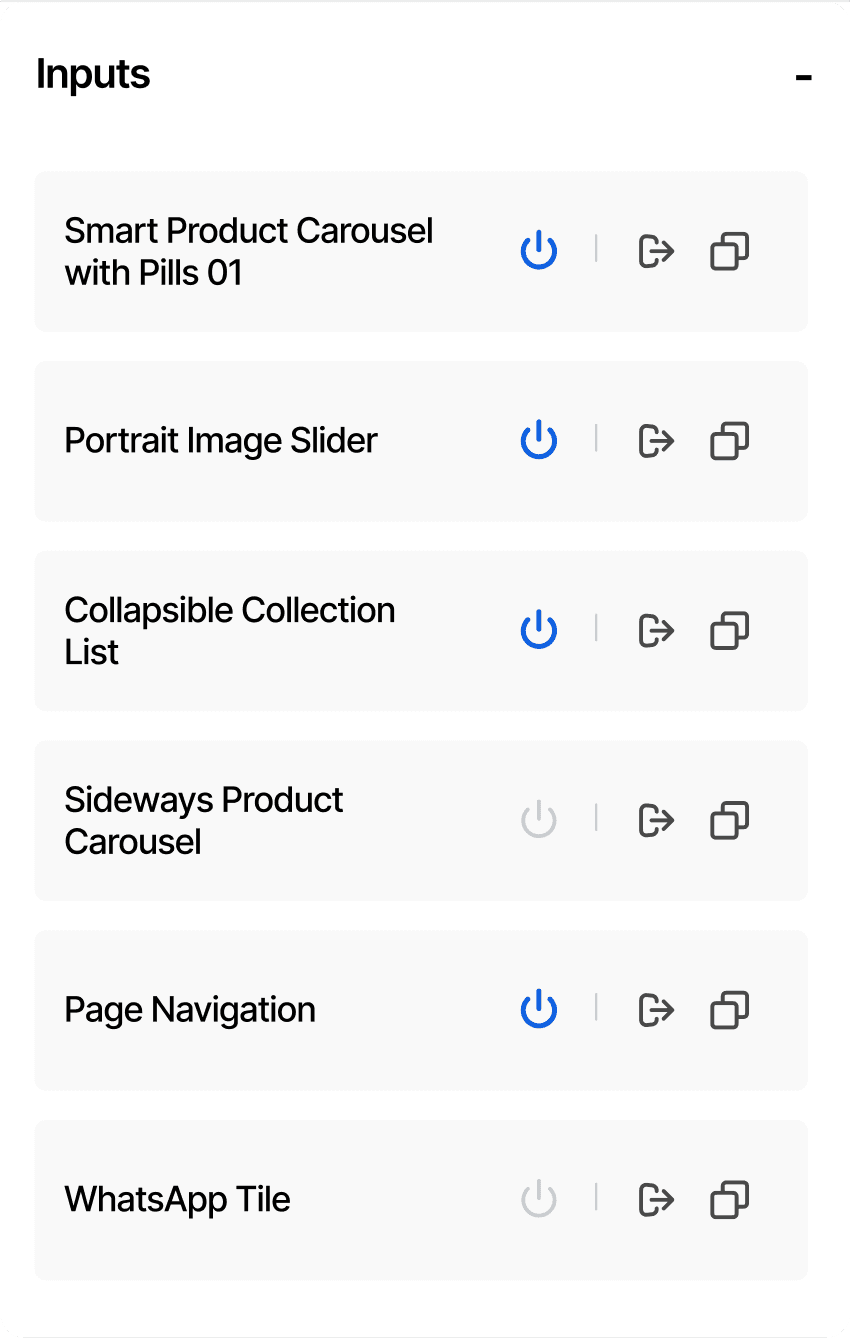
Inputs
-
Smart Product Carousel
with Pills 01
Portrait Image Slider
Collapsible Collection List
Sideways Product Carousel
Page Navigation
WhatsApp Tile
New list view instead of the block/tile format makes the tile listings more skimmable
Separating the tile switch from the Export and Duplicate (similar functionalities)
for better grouping and less accidental clicks
Clear distinction in the active/inactive states of the Tile. /
The Builder UI is a information-rich interface. A lot of unavoidable text boxes made the light interface lose contrast in certain sections of the UI. A dark mode would reduce this cognitive load.
Also since the developers reported working late nights, a dark UI was on their wishlist.

Dark Mode Switch
A new pop-up interface with elements listed made sure that the elements were dropped into the correct container
Getting rid of the older incosistent
drag-and-drop experience
Save
Preview
Code
Properties
Name
tile6
Persist Input Modules

Value
RoundedBanner
URL
https//apptile.com
Mandatory Feild
Yes
No
Name
tile6
Persist Input Modules
Value
RoundedBanner
URL
https//apptile.com
Base Plan
Pro (Live Selling Early Bird)
Pilgrim App (Aug 17th)
App ID : 15771244582
(⌘)R
Refresh


⌘
Page : CartPage
AppHeader
tile6
AppHeaderBox
BackCont
Home
Icon
Cont1
Home
LeftCont
Icon
LeftCont
Icon
Components
★ Most Used
Container
Text Input
Button
Image
Query
Text
Container
Text Input
Button
Image
Query
Text
Accurate element placement

Dark Contrast Navigation


